
This is an old revision of the document!
Table of Contents
PlayGround
-
Before we can begin with modding, there are a few important steps to prepare your environment. Please follow the instructions below to ensure everything is correctly set up.
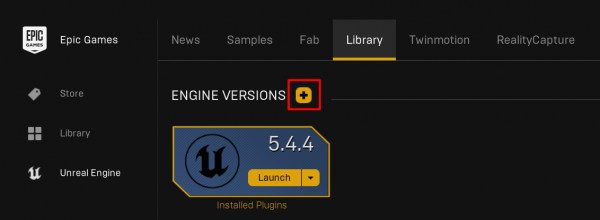
1. Install Unreal Engine 5.4.4
To get started, download and install Unreal Engine 5.4.4 using the Epic Games Launcher. It is very important to use exactly this version, as SubwaySim 2 modding tools are only compatible with 5.4.4.
- Install Unreal Engine 5.4.4 via the Epic Games Launcher.
2. Install the .NET 8.0 Runtime
After installing Unreal Engine, you will also need the .NET 8.0 Runtime. This component is required for several tools and scripts used throughout the modding workflow.
The link below should start the download automatically. Simply run the installer once the download finishes.
- Install .NET 8.0 Runtime
3. Install Visual Studio Code (for Lua Script Editing)
To comfortably edit Lua scripts later on, we recommend installing Visual Studio Code. It is completely free and supports Lua through community extensions.
- Download Visual Studio Code here: Visual Studio Code – Download
Once installed, open VS Code and navigate to the Extensions section. Search for “Lua”, then install the extension created by sumneko. This extension provides syntax highlighting, IntelliSense, linting, and many helpful features for scripting.
- Open VS Code → Extensions
- Search for: Lua
- Install the extension by sumneko

You are ready to start modding!
Once these steps are completed, your system is fully prepared and you are ready to begin creating mods for SubwaySim 2.