
This is an old revision of the document!
Table of Contents
Exporting Assets
This section explains how to export an Unreal Engine asset (uasset) — such as a Static Mesh or Skeletal Mesh — back into the FBX format.
This is especially useful when you need reference meshes, for example:
- To create accurate Superstructure Data Assets
- To align new meshes correctly in Blender
- To match origins, scale, and orientation with existing assets
Selecting the Asset to Export
First, locate the mesh you want to export in the Content Drawer.
This can be:
- A Static Mesh
- A Skeletal Mesh
Once you have found the asset:
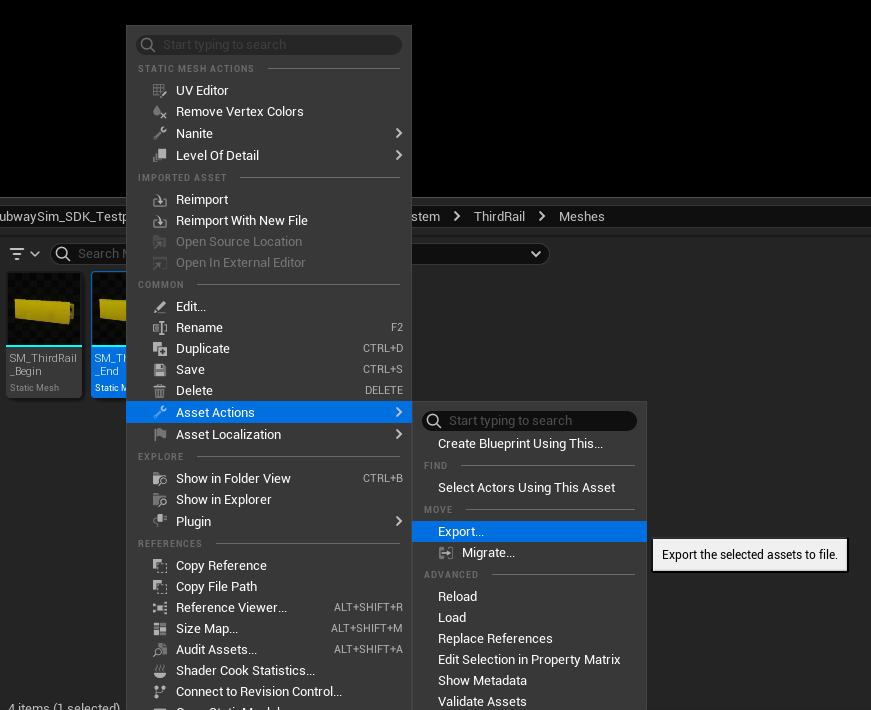
- Right-click on the asset
- Navigate to Asset Actions
- Select Export
Choosing the Export Location
After selecting Export, a file dialog will appear.
- Choose a folder where the exported file should be saved
- Confirm the location
Unreal Engine will now open the export settings dialog.
Export Settings
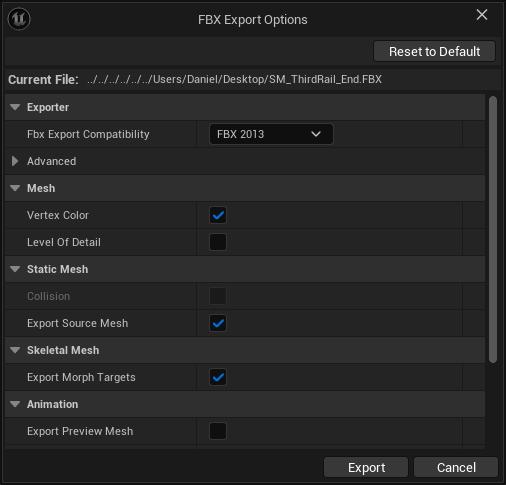
In the export settings window, you can choose which parts of the mesh should be exported.
This includes:
- The base mesh
- Optional LOD meshes
- Additional mesh data
For reference purposes, we usually only need the base mesh.
Set the checkboxes according to the reference image:
- Export only the base mesh
- Disable additional LOD exports (unless specifically needed)
Using the Exported FBX
After confirming the export:
- The FBX file will be created in the selected folder
- You can now import it into Blender or another 3D tool
The exported mesh can now be used as a reference for:
- Correct origin placement
- Scale comparison
- Mesh alignment
- Infrastructure or Superstructure development
Exporting assets in this way allows you to work accurately and consistently when creating new content based on existing SubwaySim 2 assets.
© 2026 Simuverse Interactive · SubwaySim 2 Modding Wiki
All trademarks and registered trademarks are the property of their respective owners. This Wiki is provided for documentation and modding purposes only.