
Table of Contents
Modding Framework Explained
To understand how modding for SubwaySim 2 works, we first need to take a closer look at how the system itself is structured. This section explains the folder layout of the Modding SDK, which parts are relevant for mod creators, and which elements should never be modified. Step by step, we will navigate deeper into the framework and uncover how everything fits together.
The Modding SDK Folder Structure
After downloading and extracting the Modding SDK into a directory of your choice, you will notice a large number of folders and several important files. For modding, the most important elements are:
- The file SubwaySim2.uproject
- The Plugins folder
- The Mount folder
These components form the foundation of every modding workflow.
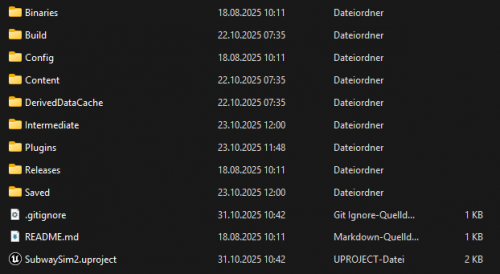
SubwaySim2.uproject
The file SubwaySim2.uproject is the main Unreal Engine project file. Launching this file will open the editor directly into the SubwaySim 2 SDK project without the need to navigate through menus.
We strongly recommend always starting the editor via this file to avoid loading issues or missing configurations.
The Plugins Folder
The Plugins directory is another crucial part of the SDK. This is where all assets required for modding are stored — and later, it will contain your own mod as well.
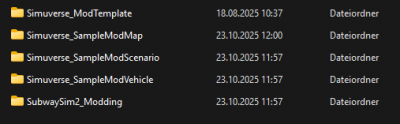
Navigate to: Plugins\SubwaySim_Extern
Inside this directory, the only folder relevant to mod creators is: SubwaySim_Extern
All other plugin subfolders must not be modified, as doing so may result in issues or broken mods inside the game.
Understanding the Plugin System
Inside SubwaySim_Extern, you will find all plugins delivered with the SDK.
A very important rule for working with the plugin system:
When building a mod using BuildMod.bat, only the selected plugin folder will be packaged into the .pak file.
This means:
- Any new assets you create must be placed inside the plugin folder of your mod.
- If you store textures, meshes, blueprints, or other assets outside of your mod’s plugin folder, they will not be included in the final mod and will therefore be missing or cause errors in the game.
The only plugin you may freely reference while creating your mod is: SubwaySim2_Modding
This plugin is a core part of the SubwaySim 2 framework and provides all necessary tools, functions, and helper assets needed for modding.
The Mount Folder
The Mount directory serves as a temporary asset storage.
When accessing assets inside the pak file(s) of the game, you may unintentionally create assets “inside the pak file”. These assets are temporarily stored in the Mount folder and must be moved to your mod plugin folder to be accessible. When building the mod, the script will print a warning if there are dangling assets inside this temporary folder.
Creating Your Own Plugin
To continue with the modding workflow, you will need to create your own plugin where all your assets and logic will be stored.
Instructions on how to create a new plugin can be found here: Creating a Plugin
With this understanding of the Modding Framework, you are now ready to dive deeper into the modding tools and begin building your own content for SubwaySim 2.
© 2026 Simuverse Interactive · SubwaySim 2 Modding Wiki
All trademarks and registered trademarks are the property of their respective owners. This Wiki is provided for documentation and modding purposes only.